How to Find WASA Account Number on Your Bill: Complete Guide for Consumers
Finding your WASA account number is important when you want to check your water bill, download a duplicate bill, verify billing details or make an online payment. Many people keep their old bills safely but sometimes the bill gets lost, the print becomes unclear or they simply do not know which number is required for online services.
If you are confused about where to find WASA account number on your bill, this guide will explain everything in simple words. You will learn the difference between a WASA account number and other bill identification numbers, how to locate it and what to do if you forget or lose it.
WASA (Water and Sanitation Agency) provides water supply, sewerage and drainage services in different cities. Many WASA online systems allow consumers to access duplicate bills by entering their assigned account details.
What Is a WASA Account Number?
A WASA account number is a unique number given to each water connection. It works like an identity number for your WASA connection. The agency uses this number to identify your customer record, billing history, payment details and connection information.
Whenever you want to use services like:
- WASA online bill check
- WASA duplicate bill download
- WASA bill payment online
- Checking previous billing information
- Verifying consumer details
you may need your account number.
Think of it like your bank account number. Just as a bank uses your account number to find your account details, WASA uses your account number to find your water bill record.
Where to Find WASA Account Number on Your Bill?
The easiest way to find your account number on WASA bill is by checking the top section of your printed water bill.
Usually, the WASA account number is printed near important customer information. It may appear with labels such as:
- Account Number
- Consumer Number
- Customer Number
- Connection Number
- Consumer ID
The exact name can be different depending on your city and WASA department.
For example, some WASA online billing systems ask users to enter an account number to view or download a duplicate bill.
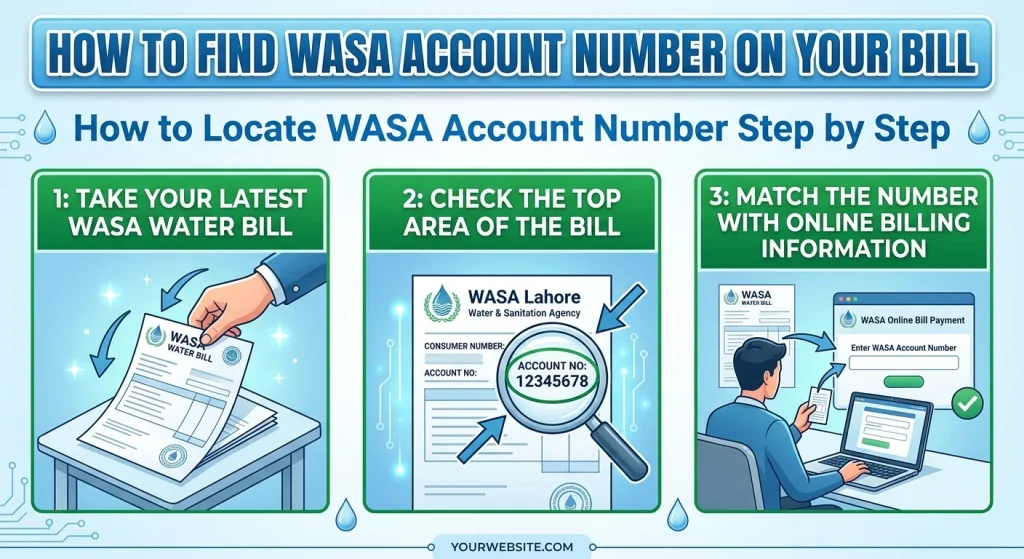
How to Locate WASA Account Number Step by Step
Follow these simple steps to identify your WASA billing account number.
Step 1: Take Your Latest WASA Water Bill
Find your latest printed WASA water bill. A recent bill is better because it contains updated billing information and connection details.
Step 2: Check the Top Area of the Bill
Look at the upper part of the bill where customer information is usually printed.
You may find details like:
Information | Purpose |
Consumer Name | Shows the registered customer name |
Address | Shows the location of the connection |
Account Number | Identifies your WASA connection |
Consumer Number | Used for customer identification |
Billing Month | Shows the bill period |
The number written next to “Account Number” is usually your WASA account number.
Step 3: Match the Number With Online Billing Information
Before using the number, check that the name and address printed on the bill belong to you.
This helps avoid entering the wrong account number during:
- WASA bill verification
- Online bill checking
- Duplicate bill requests
- Payment transactions
Difference Between WASA Account Number and Other Bill Numbers
Many consumers confuse different numbers printed on their bills. Understanding the difference can save time.
Number Type | Meaning |
WASA Account Number | Unique ID for your water connection |
WASA Consumer Number | Number used to identify the consumer record |
Customer Number | Another name sometimes used for customer identification |
WASA Bill Number | Identifies a particular bill |
Reference Number | Used for some payment and verification systems |
Connection Number | Related to your registered water connection |
Although these numbers may look similar, they may have different purposes.
For checking your WASA online bill, you should use the number requested by your city’s official billing portal.
How to Check WASA Bill Online Using Account Number?
If you have your WASA account number, checking your bill online is usually simple.
Follow these steps:
- Open your city’s official WASA billing website.
- Select the online bill or duplicate bill option.
- Enter your WASA account number.
- Submit the information.
- View your current bill details.
Different cities may use different online systems. For example, some Punjab WASA portals provide duplicate bill facilities where consumers enter their account details to access their bills.
How to Get WASA Duplicate Bill Online?
If you have lost your original bill, you do not need to visit the WASA office immediately.
You can often get a WASA duplicate bill online by using your account information.
A duplicate bill helps you:
- Check your current charges
- See the due date
- Download a copy
- Make payment without waiting for a printed bill
Some WASA systems allow consumers to download duplicate bills by entering their assigned account number.
What To Do If You Forgot WASA Account Number?
Many people face this problem when they need to pay their bill but cannot find their old invoice.
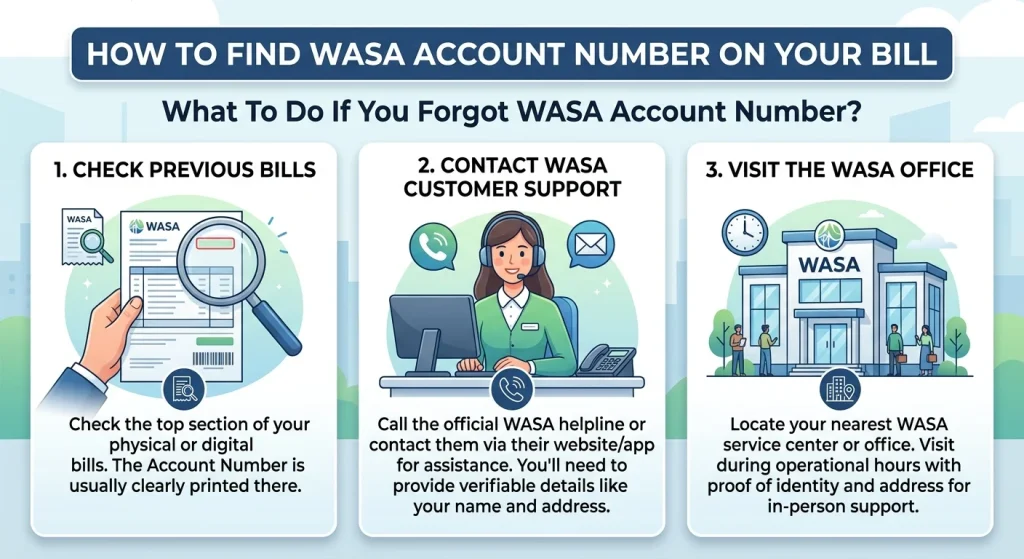
If you forgot your WASA account number, try these methods:
Check Previous Bills
Old bills usually contain the same account information. If you saved a previous copy, you can find your number there.
Contact WASA Customer Support
You can contact your local WASA office and provide details such as:
- Consumer name
- Registered address
- Connection information
The customer service team can guide you about finding your account details.
Visit the WASA Office
If online methods do not work, visiting the nearest WASA office with ownership or connection details can help recover your information.
Can I Check WASA Bill Without Account Number?
In most cases, checking a WASA bill online requires an account number, consumer number or another identification number.
The reason is simple: WASA needs a unique identifier to find your billing record.
Without an account number, the system may not know which connection belongs to you.
If you do not have the number, recovering it first is usually the best option.
How WASA Account Number Helps in Online Payments?
Your WASA account details make online services easier and faster.
You may need your account information for:
- Mobile banking payments
- Online bill payment platforms
- Bill status checking
- Duplicate bill downloads
- Customer information verification
Many banking services require a customer ID or reference information when processing utility bill payments.
Common Problems While Finding WASA Account Number
The Number Is Not Clear on the Bill
Sometimes old bills become damaged or faded.
Solution: Use a recent bill copy or download a duplicate bill online.
Confusion Between Account Number and Consumer Number
Many people enter the wrong number because several identification numbers appear on the bill.
Solution: Check the exact label requested by the online portal.
Lost Printed WASA Bill
If your bill is missing, you can try the WASA online billing system or contact customer support.
Tips to Keep Your WASA Billing Information Safe
To avoid problems in the future:
- Save a digital copy of your WASA bill.
- Keep your account number written somewhere safe.
- Use official WASA websites for bill checking.
- Check your name and address before making payments.
- Keep payment receipts after online transactions.
FAQs
A WASA account number is a unique identification number assigned to your water connection. It helps WASA identify your billing record and customer information.
The WASA account number is usually printed in the customer information section at the top of your water bill. It may be written as Account Number, Consumer Number or Customer Number.
You can check your WASA bill online by visiting the relevant WASA billing portal and entering your required account information.
You can download a duplicate WASA bill through the online billing system by entering your account number or consumer details.
Check old bills, saved documents or contact your local WASA customer service center for help recovering your account details.