WASA Bill Online Faisalabad 2026
You can check your WASA Bill Online Faisalabad by entering the account number printed on your previous water bill. The online bill shows the billing month, due date, current charges, outstanding balance and total amount payable.
You can also download a WASA duplicate bill as a PDF, print a copy or use the bill details to make a digital payment. This service is useful when the original bill is late, damaged or lost. it is also similar Like Gepco Bill Check.
WASA Bill Online Faisalabad
Use the WASA bill checking tool on this page and follow these simple steps:
- Enter your WASA account number.
- Check the number carefully.
- Select the bill check button.
- View your latest bill.
- Download or print the bill if needed.
The official WASA Faisalabad website also provides a duplicate bill service that asks consumers to enter their WASA account number.
Bill Check Information
Required information | Details |
Bill provider | WASA Faisalabad |
Main requirement | Consumer account number |
Service type | Water and sewerage bill inquiry |
Bill format | Online duplicate bill |
Download option | PDF or browser download |
Printing option | Available through browser or PDF |
Payment requirement | Account or invoice details from the bill |
Complaint helpline | 1334 |
How to Check WASA Bill Online Faisalabad
The complete process usually takes only a few minutes.
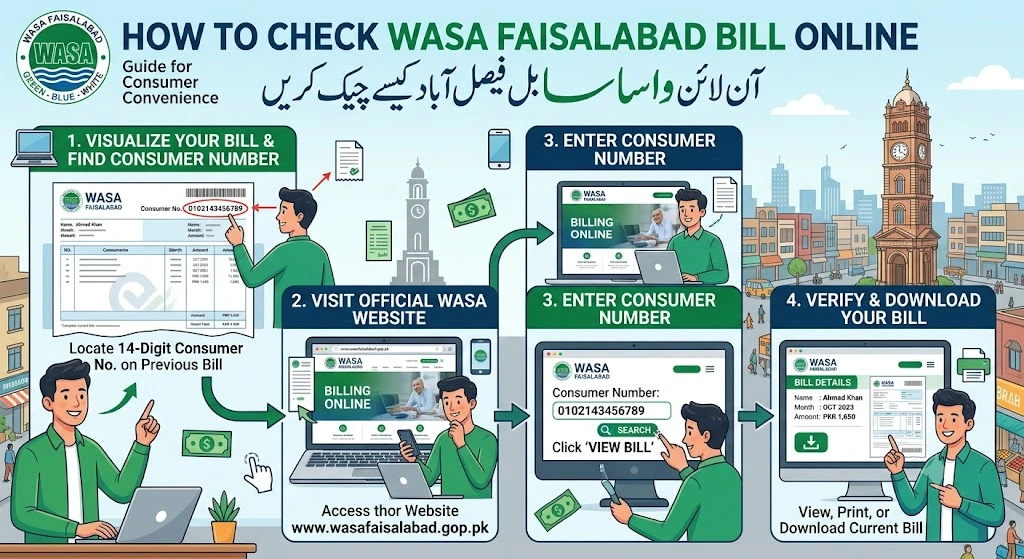
Step 1: Find Your Account Number
Take an old WASA Faisalabad bill and look for the account number. It may appear near the top section of the bill with the consumer information.
Step 2: Enter the Number
Type the full account number in the online bill checking box. Do not add spaces unless the system displays them automatically.
Step 3: Open Your Bill
Select the check bill or view bill button. The billing system will search for the latest bill linked to your water connection.
Step 4: Verify the Bill
Before making a payment, confirm these details:
- Consumer name
- Service address
- Billing month
- Due date
- Current charges
- Previous balance
- Total payable amount
Step 5: Save a Copy
Download the WASA duplicate bill or take a clear printout. Keeping a copy can help if the payment status is not updated correctly.
Punjab Information Technology Board states that the WASA duplicate billing system allows consumers to retrieve a duplicate bill by entering the assigned account number. The billing data is uploaded to the system by the relevant WASA offices.
Where to Find the WASA Account Number
The account number is a unique number connected to a property and its water or sewerage service connection. It helps the billing system find the correct consumer record.
You can usually find it in the upper section of an old bill. Look near the consumer name, address, billing month or account information.
Do not enter the meter number, invoice amount, mobile number or property number unless the bill checking system asks for it.
If you cannot find the account number, try these options:
- Check an older printed bill.
- Open a previous payment receipt.
- Ask the property owner or previous resident.
- Contact WASA Faisalabad customer service.
- Visit a nearby revenue office with property information.
Account Number and Reference Number Are Not Always the Same
Some utility websites use a reference number, but the official Faisalabad duplicate bill page asks for a WASA account number. Enter the number shown as the account number on your bill instead of using a FESCO electricity reference number or another utility number.
How to Download a WASA Duplicate Bill Faisalabad
A duplicate bill is a copy of your original monthly bill. It has the same consumer information, bill amount, due date and billing record.
Follow these steps to download WASA bill information:
- Complete the WASA bill check using your account number.
- Wait for the bill to open.
- Select the download or print option.
- Choose Save as PDF.
- Select a folder on your phone or computer.
- Save the file with the billing month in its name.
A useful file name can be
WASA-Faisalabad-July-2026.pdf
This makes it easier to manage your water bill history.

What to Do If the Bill Does Not Download
A bill may fail to download because of a slow internet connection, blocked pop-ups, incorrect account details or a temporary billing system problem.
Try these solutions:
- Refresh the page.
- Check the account number again.
- Allow pop-ups in your browser.
- Open the page in another browser.
- Try again after a few minutes.
- Use a computer if the PDF does not open on your phone.
How to Print WASA Bill Faisalabad
After opening the bill, select the print icon or press Ctrl + P on a computer.
Choose the correct printer and use A4 paper. Check the preview before printing so the account number, due date, payment amount and barcode remain clear.
You do not always need a color print. A clear black and white copy is normally easier to read and uses less ink.
How to Pay WASA Bill Online
Faisalabad Water and Sewerage Authority appears as a supported utility biller in the 1LINK biller list. This means a participating banking or payment channel may provide a digital WASA bill payment option. The name may appear as Faisalabad Water and Sewerage Authority, FWASA or another similar label.
Follow these general steps:
- Open your mobile banking or internet banking app.
- Select Bill Payment or Utility Bills.
- Choose Water or WASA.
- Select Faisalabad Water and Sewerage Authority or FWASA.
- Enter the requested consumer or account number.
- Wait for the bill details to appear.
- Check the consumer name and amount.
- Complete the payment.
- Save the digital payment receipt.
1LINK explains that its 1BILL service allows member banks and non-bank payment providers to collect payments for utilities and other registered billers.
Check These Details Before Paying
Never confirm a payment until you have checked:
- Consumer name
- Account number
- Billing month
- Total amount
- Due date
- Payment provider name
If the displayed name or amount does not match your bill, cancel the payment and check the account number.
Save Your Water Bill Receipt
A payment receipt is proof that the utility bill payment was completed. Save the receipt as an image or PDF.
The receipt should show:
- Transaction number
- Payment date
- Paid amount
- Consumer account
- Bank or payment service
- Payment status
Do not pay the same bill twice if the online status does not change immediately. First check your transaction history and payment receipt. Contact your bank or WASA Faisalabad if the payment remains missing.
Understanding Your WASA Faisalabad Bill
A water utility bill may contain water charges, sewerage charges, old unpaid amounts, and other approved billing items. The exact layout can change but these are the main fields you may see.
Bill field | What it means |
Account number | Unique number for the consumer connection |
Consumer name | Name registered with WASA |
Service address | Address receiving water or sewerage services |
Billing month | Month covered by the bill |
| Issues | No issue |
Final words
The WASA Bill Online Faisalabad service makes it easier to check the latest water and sewerage bill without waiting for a paper copy. Keep your account number safe, verify the bill details, pay through a trusted channel and save the receipt.
For a missing bill, wrong balance, payment issue, water shortage, sewerage blockage or damaged manhole, contact WASA Faisalabad through the official helpline, complaint form, WhatsApp number or service center.
Faqs
How can I check my WASA bill online in Faisalabad?
Enter the consumer account number printed on your old WASA bill into the online bill checking form. Select the check bill button to view your latest water and sewerage bill.
What information is needed to check a WASA Faisalabad bill?
You normally need your WASA consumer account number. You can find this number on an old printed bill, duplicate bill or payment receipt.
Can I check my WASA bill by reference number?
The WASA Faisalabad bill system usually asks for a consumer account number. Do not enter a FESCO electricity reference number because both services use different billing records.
How can I download a WASA duplicate bill?
First, check your bill using the account number. When the bill opens, select the download or print option. You can then save it as a PDF on your phone or computer.
Can I print my WASA Faisalabad bill?
Yes. Open your online bill and select the print option. You can also press Ctrl and P together on a computer. Check the print preview before printing the bill on A4 paper.