WASA Bill Online Rawalpindi
The WASA bill online Rawalpindi service helps you view your current water bill without visiting a WASA office. You only need the eight-digit consumer code printed on an older bill. After entering the code, you can check the amount payable, due date, previous balance and other billing details. You can also download a duplicate copy, print it or save it as a PDF.
The official WASA Rawalpindi portal offers an online bill facility and asks users to enter their consumer number to search for a bill.
WASA Bill Online Rawalpindi
Quick Answer
For a WASA bill online Rawalpindi check, open the official bill page, enter your eight-digit consumer number and press the search or check bill button. Your latest available bill should appear on the screen. Check the customer name, billing period, total amount and due date before downloading or paying it.
Important: This website is an independent information guide. It is not the official Water and Sanitation Agency website. Always confirm your bill details before making a payment.
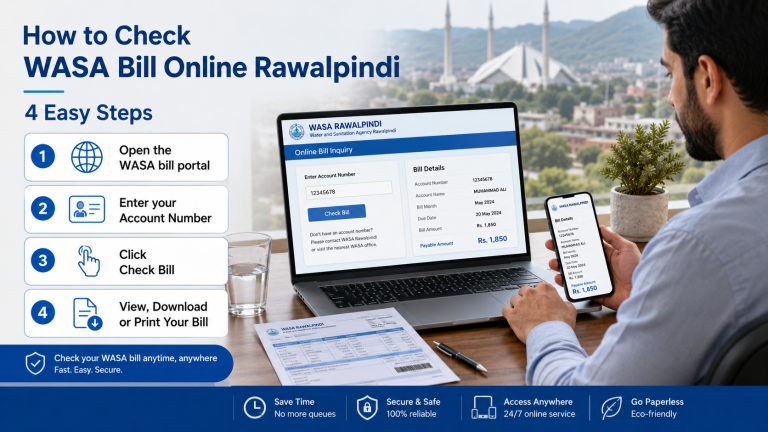
How to Check WASA Bill Online Rawalpindi
The WASA bill check Rawalpindi process is simple. Keep an old water bill near you because it contains the number needed for the bill inquiry.
Step 1: Open the bill-checking page
Use the bill-checking form on this page or visit the official WASA Rawalpindi online bill portal. Make sure the page opens correctly before entering any details.
Step 2: Enter the eight-digit consumer code
Type the consumer code exactly as it appears on your old bill. Do not add spaces, letters or extra numbers.
The official service may call this number a consumer number, consumer code or account number. An older official WASA page tells users to enter an eight-digit consumer code. The Punjab Information Technology Board also describes the duplicate bill lookup as using an assigned eight-digit account number.
Step 3: Press the check bill button
Select the search, submit or check bill option. The WASA online billing system will look for the latest record linked to your water connection.
Step 4: Review the bill information
Check the consumer name, address, billing period, current amount, outstanding amount and due date. Stop and review the consumer code again if the details belong to another property.
Step 5: Download or print the bill
Use the print option in your browser. You can print the WASA Rawalpindi bill or choose Save as PDF to keep a digital copy on your phone or computer.
What Is the WASA Consumer Number?
The consumer number is the unique code connected to your WASA water or sewerage account. The WASA bill online Rawalpindi system uses this code to find your bill record.
The current official portal asks for a consumer number. An older official WASA page describes it as an eight-digit consumer code, while PITB describes the lookup number as an assigned eight-digit account number. In practice, look for the eight-digit code on your previous bill.
You may see one of these labels on a bill or bill-checking page:
Consumer number
Consumer code
Account number
Customer number
Customer ID
Do not enter your CNIC, phone number, meter number or home address unless the official form clearly asks for it.
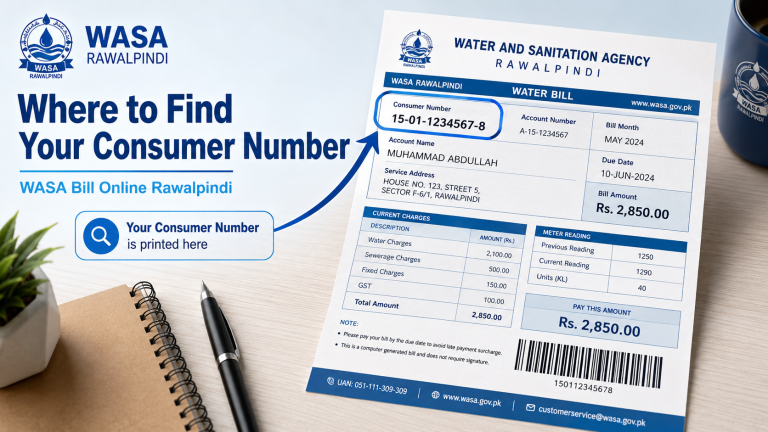
Where Can You Find the Eight-Digit Consumer Code?
Look at the upper part of an older WASA bill. The code is usually printed near the customer name, address, account details or bill number.
A clear photo of an old bill can also help. Zoom in and check each digit carefully. Common mistakes include typing zero as the letter O, missing the first zero or entering the bill number instead of the consumer number.
If you have no previous bill, contact WASA customer service. Keep the property address and connection holder’s name ready so the staff can guide you.
Information Shown on Your WASA Rawalpindi Bill
A water bill contains more than the final payable amount. Reading the main fields helps you find errors and avoid late payment.
Bill field | What it means | What you should check |
Consumer number | The code linked to your connection | It should match your previous bill |
Billing period | The month or time covered by the bill | Make sure it is the latest period |
Current amount | Charges added for the current period | Compare it with recent bills |
Previous balance | An unpaid amount carried forward | Check your last payment receipt |
Total payable | The full amount due | Pay the amount shown for the correct date |
Due date | Last date for normal payment | Pay before this date where possible |
Amount after due date | Amount that may include a surcharge | Use this amount after the due date |
Connection category | Domestic or commercial connection type | It should match the property use |
Water or sewerage charges | Charges linked to WASA services | Report unusual or unexplained changes |
The exact layout can change. Read the labels printed on your bill instead of relying only on a sample image.
How to Download a WASA Duplicate Bill Rawalpindi?
A duplicate bill is a copy of the bill stored in the online system. It is useful when the paper bill is late, lost, damaged or delivered to the wrong address.
Complete the WASA bill online Rawalpindi search first. When the bill appears, use the print or download option. If there is no download button, press Ctrl + P on a Windows computer or Command + P on a Mac. Select Save as PDF as the printer and save the file.
On a mobile phone, open the browser menu and select Print, Share or Save as PDF. The wording may be different on Android and iPhone.
Give the file a clear name, such as:
WASA-Rawalpindi-July-2026.pdf
This makes the water bill duplicate copy easier to find later.
How to Print the WASA RWP Bill?
Open the duplicate bill and check that the full page is visible. Select Print from the browser menu. Choose A4 paper, portrait view and normal scale.
Preview the page before printing so the consumer number, due date, bill amount and payment section are not cut off.
A black-and-white print is normally easier to read and uses less ink. Keep the printed copy with your payment receipt if you manage bills for a rented house, office, shop or family property.
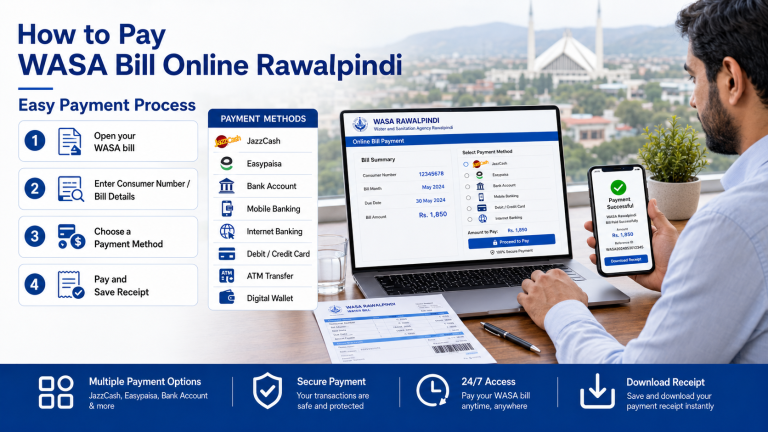
How to Pay WASA Rawalpindi Bill Online?
Once your WASA bill online Rawalpindi result appears, you may be able to pay through a supported bank app, ATM, mobile wallet, microfinance service or another approved payment channel.
WASA Rawalpindi entered an e-billing arrangement with NADRA e-facility in March 2024. Reports about the agreement said the supported microfinance channels included JazzCash, Easypaisa, MobiCash and UPaisa. Payment menus and biller availability can change, so confirm that WASA Rawalpindi appears in the app before approving a payment.
A normal mobile payment process works like this:
- Open your bank or wallet app.
- Select Bill Payment or Utility Bills.
- Choose Water or WASA.
- Select WASA Rawalpindi when available.
- Enter the required consumer or reference number.
- Confirm the customer name and payable amount.
- Complete the payment.
- Save the digital receipt or transaction ID.
Never pay when the app shows a different customer name, city or amount. Cancel the transaction and check the number again.
Paying Through JazzCash or Easypaisa
To make a WASA bill payment through JazzCash or Easypaisa, open the bill payment section and search for WASA or water bills. Select the Rawalpindi biller if it is listed.
Enter the required consumer or reference number and review the fetched billing details.
Do not choose WASA Lahore, Faisalabad, Gujranwala or another city by mistake. A successful payment should provide a confirmation message, payment receipt, or transaction ID.
Save a screenshot until the payment appears in WASA records.
How to Check WASA Bill Payment Status?
The easiest first step is to check the receipt in your banking or wallet app. Make sure the transaction says successful and not pending, reversed or failed.
Next, check the latest bill record after the payment has had time to update. Payment posting may not always appear immediately. Do not pay the same bill twice only because the online record has not changed at once.
If the amount still appears unpaid, contact your payment provider and WASA customer service. Share the following information privately:
- Consumer number
- Payment date
- Paid amount
- Transaction ID
- Payment receipt
Do not publish these details on social media.
What to Do If Your Bill Is Not Showing
If the WASA bill online Rawalpindi page does not show your bill, the cause may be a small typing error, a temporary website problem or a billing record that has not been uploaded yet.
Check the consumer code
Enter all eight digits again. Remove spaces and check the first and last digits. Use the code from a recent bill for the same property.
Try again later
The official portal may be under maintenance or may be receiving many visitors. Refresh the page, use another browser or try again after some time.
Check the billing period
The newest monthly bill may not appear at the same time for every area. PITB explains that WASA zonal offices upload their respective bills to the online system each month. This means the online record depends on the latest billing information being added to the database.
Contact customer service
Contact WASA when the code works but the record remains missing. You should also report the issue if the page shows the wrong name, address, category or water connection.
Common Online Bill Problems and Solutions
Problem | Possible reason | What to do |
Consumer number not accepted | A digit is missing or incorrect | Enter the eight-digit code again |
Blank bill page | Browser or website problem | Refresh the page or use another browser |
Old monthly bill appears | New record may not be uploaded | Check again later or contact WASA |
Wrong customer appears | Incorrect consumer number entered | Stop and verify the code |
Payment remains unpaid | Payment may still be updating | Keep your receipt and contact support |
Bill will not print | Browser print settings are incorrect | Use print preview or save as PDF |
Page is not opening | Temporary server or internet problem | Check your connection and try later |
Why Is My Water Bill Higher Than Usual?
A high bill does not always mean the online system is wrong. First, compare the current amount with the previous water bill and look for arrears or a late payment surcharge.
Possible reasons may include:
- An unpaid previous balance
- A connection category issue
- A tariff or charge update
- A correction from an older billing period
- Added water or sewerage charges
- A payment that has not been posted
- Increased water use
- A leak inside the property
Do not guess the reason. Keep a clear copy of the current bill, previous bill and latest payment receipt. Ask WASA for a billing review if the increase is large or unexplained.
Current Amount, Outstanding Amount and Late Surcharge
The current amount covers charges added during the latest billing period.
The outstanding amount is money carried forward from an earlier unpaid or unsettled bill. The total amount payable may include both the current charges and the old balance.
A late payment surcharge is an extra amount that may apply after the due date. Your bill may show one amount before the due date and another amount after it.
Pay the correct amount for the date on which you make the payment.
If you already paid but an outstanding balance appears again, keep your payment receipt and report the issue. Do not pay the same bill twice without checking its payment status.
Domestic and Commercial Water Connections
A domestic connection is normally linked to a home used for living.
A commercial connection is normally used for a shop, office, business or another commercial property.
The connection category matters because billing rules and charges may be different. Check the category printed on your bill. Contact WASA if your property appears under the wrong type.
Tenants should keep a copy of each monthly water bill and payment receipt. Property owners should also check old dues before a new tenant moves in or after a tenant leaves.
WASA Rawalpindi Complaints and Customer Support
Use the WASA complaint service for:
- Missing bills
- Incorrect customer information
- Disputed arrears
- Payment posting problems
- Water supply complaints
- Sewerage complaints
- Emergency issues
- Incorrect connection categories
The current official WASA Rawalpindi contact page lists 051-5555489 for general contact, info@wasarwp.gop.pk for email, and 1334 as the emergency helpline. It lists the office address as Liaquat Bagh, Murree Road, Rawalpindi.
When reporting a billing problem, provide:
Consumer number
Account holder’s name
Property address
Billing month
Short description of the problem
Payment receipt or transaction ID, when needed
Never send your banking password, wallet PIN, ATM PIN, OTP or complete card details.
What to Do When the Bill Has the Wrong Name or Address
A small spelling difference may not stop bill checking but incorrect account information should still be reported.
Keep a copy of your water connection documents, identity document, previous bill and current bill. Contact WASA customer service and ask which documents are required for a correction.
Do not change the consumer number yourself. The number must remain linked to the correct WASA billing record.
How to Apply for a New WASA Connection?
The official WASA website provides access to information and a form for a new connection.
The process may require property documents, identity documents, connection details and approval from the relevant office.
Requirements may change based on:
- Property ownership
- Tenancy
- Property category
- Domestic or commercial use
- Connection location
- Water and sewerage availability
Download the latest form from the official portal or contact the consumer care center before arranging documents or paying a fee.
After receiving a new connection, keep the first bill safe. It contains the consumer code needed for future WASA bill online Rawalpindi searches.
Safety Tips for Checking a Water Bill Online
Use a trusted website and make sure the payment page belongs to your bank, wallet provider or an approved bill service.
A bill-checking page should not ask for:
- ATM PIN
- Wallet PIN
- Banking password
- Card PIN
- One-time password
- Full debit or credit card details
Check the spelling of the website address. Avoid payment links sent by unknown people.
Do not share screenshots that display your complete consumer number, property address, phone number or payment details.
An information website may help you understand the process but the final bill details should come from the official WASA billing record.
Why the Online Duplicate Bill System Is Useful?
PITB says it developed the WASA Online Duplicate Billing System in 2013. Before the online service, customers had to visit their zonal offices to collect duplicate bills.
The system was designed to let consumers retrieve a duplicate bill using an assigned eight-digit account number. PITB also states that the relevant WASA zonal offices upload their billing data to the system each month.
This service is useful for people who:
- Lose a paper bill
- Receive their bill late
- Live away from the property
- Manage a rented property
- Handle bills for older family members
- Need a bill copy for their records
- Manage more than one connection
Practical Example
The following example is fictional and is only included to explain the process.
Ahmad manages the water bill for his parents’ home in Rawalpindi. The paper bill does not arrive but he has a photo of last month’s bill.
He finds the eight-digit consumer code and completes the WASA bill online Rawalpindi check. He confirms the customer name and property address, reads the bill due date and saves the duplicate bill as a PDF.
He then pays through a supported banking app and saves the transaction receipt in the same phone folder.
This simple record helps him show proof of payment if the next bill displays an old balance.
Tips for Managing Your Monthly Water Bill
Keep one digital folder for your WASA billing details. Save each monthly bill and payment receipt using the same naming format.
For example:
- WASA-Bill-July-2026.pdf
- WASA-Receipt-July-2026.jpg
Set a phone reminder a few days before the due date. This reduces the risk of late payment and gives you time to solve a bill error.
Compare the latest bill with the previous bill each month. Report an unexpected increase instead of waiting for several billing periods.
Final Words
The WASA bill online Rawalpindi service gives consumers a simple way to check a current bill, download a duplicate copy and maintain a clear payment record.
The most important item is the eight-digit consumer code from an older bill. Always confirm the customer name, property address, billing period, amount payable and due date before making a payment.
Save each bill and payment receipt. Contact WASA when information is missing, incorrect or not updated after payment.
Frequently Asked Questions
How can I check my WASA bill online in Rawalpindi?
For a WASA bill online Rawalpindi search, enter the eight-digit consumer number from an older bill into the official online bill form. Submit the form to view the latest available bill record
Can I check the bill using my CNIC?
The official bill lookup is based on the consumer number or consumer code. A CNIC is not normally used in the standard online bill search form.
What should I do if I lose my paper bill?
Use your consumer code to download a WASA duplicate bill Rawalpindi. You can print the bill or save it as a PDF.
What happens if I pay after the due date?
A late payment surcharge may apply. Check the amount shown for payment after the due date on your own bill.
Can I print an online duplicate bill?
Yes. Open the bill and select Print from your browser. You can also choose Save as PDF to keep a digital copy.