WASA Bill Online Gujranwala
Water is the most important resource we use every single day. If you live in Gujranwala, the Water and Sanitation Agency Gujranwala works hard to deliver clean water to your home and keep the drainage systems working. To keep this supply active, every home and commercial consumer must pay their utility bills on time.
In the past, losing a paper bill meant standing in long lines at the local office under the hot sun just to get a copy. Today, you do not need to worry about lost bills, wet paper statements or late fees. The government has introduced a simple digital process that lets you perform a quick wasa gujranwala bill check right from your smartphone or computer.
WASA Bill Online Gujranwala
What is WASA Gujranwala?
The abbreviation WASA stands for Water and Sanitation Agency. The branch in Gujranwala was created in November 1997 as a special division of the Gujranwala Development Authority.
WASA is tasked with planning, building and maintaining water supply systems, sewer systems and water drains across 73 urban areas in the city. When you receive your monthly statement, the total charge includes both your clean water usage and your sewerage bill gujranwala.
Important Things Needed to Check Your Bill Online
The online utility billing systems protect your privacy. This means you do not search for your bill using your name, your CNIC or your physical home address. Instead, the database keeps track of your connection through special identification codes.
To search the database, you must have an old paper bill with you to find one of these two details:
- Account Number: A short 6-digit number unique to your domestic or commercial water meter connection.
- Registration Number: A longer code that follows a set format, usually looking like 00/00-000000.
Look at the very top section of any previous month’s physical bill to easily find both of these numbers printed in clear text.
Step-by-Step: Check WASA Water Bill Gujranwala Online
The Punjab Information Technology Board built a central pitb duplicate billing system to help citizens quickly view their accounts online.
Follow these easy steps to view your live bill on your device:
Step 1.Open the Official Portal:
Launch the web browser on your phone or computer. Go to the official billing website managed by the government of Punjab at onlinebill.wasagujranwala.gop.pk.
Step 2.Select Your Search Option:
Once the homepage loads, look for the two round selection options on the form. You can choose to search by Account No. or by Registration No.. Tap the one you want to use.
Step 3.Type in Your Number:
Carefully enter your 6-digit account number or your registration number into the empty search box. Do not add any extra spaces or incorrect characters.
Step 4.Generate the Bill:
Click the Search button. Within a few seconds, the screen will reload to display your current monthly bill with your due date and payment status.
How to Get a WASA Gujranwala Duplicate Bill Print and Download
If you need a physical copy of your bill to pay in cash or to save a digital proof of address on your computer, you can download it easily.
Once your statement is displayed on your screen using the search steps above, follow these steps:
- For Laptop/Desktop Users: Press Ctrl + P on your keyboard to open the print options. Under the Destination menu, select Save as PDF and click the save button to store it on your hard drive.
- For Smartphone Users: Tap your browser’s options menu (the three vertical dots in the corner), tap the Share option and select the Print icon. Choose the Save as PDF option to download the digital file directly to your phone.
Now you have successfully performed a wasa duplicate bill online download. You can take this PDF file to any nearby computer shop for a quick wasa bill print online gujranwala process on physical paper.
Easy Ways for WASA Gujranwala Online Payment
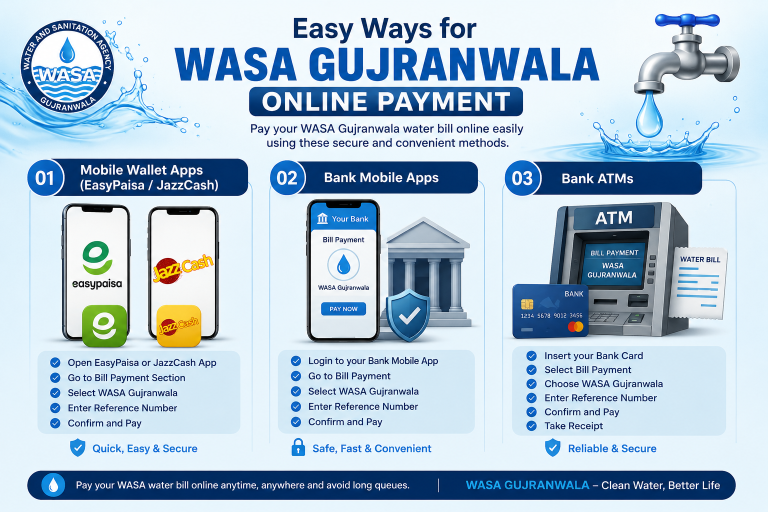
You do not have to wait in long lines under the sun to deposit your bill anymore. Multiple modern channels exist to complete your wasa bill payment online gujranwala using digital payment systems.
1. Mobile Wallet Apps (EasyPaisa / JazzCash)
You can pay your bills in less than a minute using any active mobile wallet app on your phone:
- Open the EasyPaisa or JazzCash application on your smartphone.
- Tap on the Bill Payment icon on your home dashboard.
- Select Water as your utility bill category.
- Choose WASA Gujranwala from the list of water departments.
- Enter your wasa gujranwala reference number (which is your account number).
- Confirm that the customer name and billing amount match your actual bill details and tap pay to complete the transfer.
2. Bank Mobile Apps and ATMs
If you have a traditional bank account in Pakistan, you can pay using your bank’s mobile app or internet banking site:
- Log in to your banking application (such as myABL, BOP Mobile, HBL Mobile or NBP Digital).
- Head to the Bill Payments section.
- Choose to add a New Biller and select the Water utility department.
- Choose WASA Gujranwala and enter your consumer number.
- Verify your bill details and click pay.
Note: You can also use your local ATM card at any ATM machine to complete this payment. Insert your card, choose Bill Payments, select WASA, type in your consumer number and confirm.
3. Paying with Cash
If you prefer traditional cash payments, print out your wasa grw duplicate bill and visit:
- Any branch of the General Post Office (GPO).
- Authorized commercial banks like National Bank of Pakistan (NBP), Bank of Punjab (BOP), Allied Bank Limited (ABL) or Bank Alfalah.
Paying Through JazzCash or Easypaisa
To make a WASA bill payment through JazzCash or Easypaisa, open the bill payment section and search for WASA or water bills. Select the Gujranwala biller if it is listed.
Enter the required consumer or reference number and review the fetched billing details.
Do not choose Wasa Lahore, Wasa faisalabad, Rawalpindi or another city by mistake. A successful payment should provide a confirmation message, payment receipt, or transaction ID.
Save a screenshot until the payment appears in WASA records.
WASA Gujranwala Contact Details and Consumer Support
If you experience water pressure issues, notice a leaking pipe in your street or find an error in your calculated bill, you can contact the WASA staff directly. Use the table below to find their verified details:
Support Detail | Official Contact Information |
Main Office Address | X-Block, Peoples Colony, Gujranwala |
Official Helpline Number | +92 55 923 0140 |
Official Email Address | |
Main Office Hours | Monday to Saturday, 9:00 AM to 4:00 PM |
Billing Web Address |
Mobile Management and Online Bill Tracking
For better control, you can use the official punjab wasa app developed by the provincial government.
This mobile application lets you look up water services, report problems and access digital online bill tracking from your phone. It provides a transparent way to see when a complaint is registered and when the maintenance team resolves the issue in your neighborhood.
Frequently Asked Questions
You can check your WASA bill online by entering your Reference Number or Account Number on the bill checking page. Your latest water bill will appear instantly, and you can download or print it if needed.
If you have lost your original bill, you can get a duplicate copy online. Simply enter your billing details on the bill checking page, and you can view, download or print your duplicate bill.
Yes. You can pay your WASA Gujranwala bill through supported online banking apps, mobile wallets, or other digital payment services if they are available.
Your Reference Number is printed on your previous WASA bill. If you cannot find it, you can check an older bill or contact the WASA Gujranwala office for assistance.
First, make sure you entered the correct Reference Number or Account Number. If your bill still does not appear, wait for some time and try again. If the issue continues, contact WASA Gujranwala for support.