How to Check WASA Billing History Online
Checking your old water bills can help you understand how much you paid in previous months, whether any amount is still unpaid, and whether your latest payment has been added to your account. If you have a Water and Sanitation Agency connection, you may be able to check some of this information online.
The exact method for how to check WASA billing history depends on the WASA office serving your city. WASA Lahore, WASA Faisalabad and other local agencies may use different billing systems. Some online bills show recent payment history, while others mainly provide the current bill or a duplicate bill.
For example, the official WASA Faisalabad web bill currently includes a payment history section along with the billing period, issue date, due date, current charges, arrears, service charges and payable amount.
This guide explains how to check your available WASA billing information, find old payment details, verify outstanding amounts, download a duplicate bill and understand the information shown on your water bill.
What Is WASA Billing History?
WASA billing history is the record connected with your water and sewerage billing account. Depending on the billing system used in your city, it may show information about previous payments or earlier billing periods.
Your billing record may include details such as:
Billing Detail | What It Means |
Billing period | The month or period covered by the bill |
Current bill | Charges for the latest billing period |
Previous payment | A payment recorded for an earlier bill |
Arrears | Unpaid amount carried forward |
Water charges | Charges for water service |
Sewerage charges | Charges related to sewerage service |
Service charges | Other applicable service charges |
Due date | Last date to pay before late charges may apply |
Payable amount | Total amount you need to pay |
Surcharge | Extra amount that may apply after the due date |
Account number | Number used to identify the WASA connection |
A WASA bill history online service can be useful when you want to confirm whether an earlier payment has been recorded or check why the amount on your latest bill is higher than expected.
However, do not assume that every online WASA system provides a complete archive of all old bills. Some portals only display the latest consumer bill and a limited recent payment record.
How to Check WASA Billing History Online
The easiest way to start is with your latest printed or digital WASA water bill. Keep your account number, consumer number or reference information ready.
To check your available WASA billing history:
- Open the official website of the WASA office that serves your city.
- Find the online bill, duplicate bill, consumer bil or billing section.
- Enter the account number or other billing number requested by the portal.
- Submit the information and open your consumer bill.
- Look for sections such as Payment History, Previous Payment, Arrears, Billing Period or Account Details.
- Compare the previous payment information with your own payment receipts.
- Check the current bill amount, due date, outstanding amount and any surcharge.
- Print the page or save a copy for your personal records if needed.
The labels can be different from one WASA website to another. For this reason, always follow the fields shown on your local official billing portal.
Can You Check WASA Billing History Without Login?
In some cities, yes.
For example, WASA Faisalabad provides an official duplicate bill page where a consumer can enter a WASA account number to retrieve the consumer bill. The public form does not show a separate account login requirement before entering the billing number.
This means a WASA bill without login may be available where the local agency provides a public bill lookup system.
You should still use only a trusted WASA website when entering your account information. Avoid unknown websites that request unnecessary personal details, passwords, CNIC information or payment credentials simply to display a bill.
Check WASA Bill by Consumer Number
A consumer number is used to connect a billing record with a particular water connection. Depending on your WASA office, the same identifier may be called an account number, consumer number or another similar name.
If your bill has a consumer number and the online portal asks for it, enter it exactly as printed.
Do not add extra spaces or change any digits.
After submitting the number, you may be able to see your current bill, billing period, amount due, previous payment details and other consumer information.
If the system says that the number is invalid, first check the printed bill again. A single wrong digit can stop the WASA bill check from working.
Check WASA Bill by Reference Number
Some utility services use a reference number for online bill checking. WASA billing systems, however, can use different account formats in different cities.
If your local WASA online bill page specifically asks for a reference number, use the reference number printed on your bill.
If it asks for an account number instead, do not enter another utility company’s reference number.
Always follow the field name used by your local WASA portal.
This distinction is important because people often search for check WASA bill by reference number even when their local system identifies the connection through a WASA account number.
Where Can I Find My WASA Account Number?
Your WASA account number is normally printed on your water bill.
Look near the consumer information, connection details, billing details or account information area.
The official WASA Faisalabad duplicate bill system specifically asks users for a WASA Account Number. Its online consumer bill also displays the account number as part of the connection details.
If you do not have an old bill and cannot find your account number, contact the WASA office responsible for your area. You may need to provide information that helps staff identify the water connection.
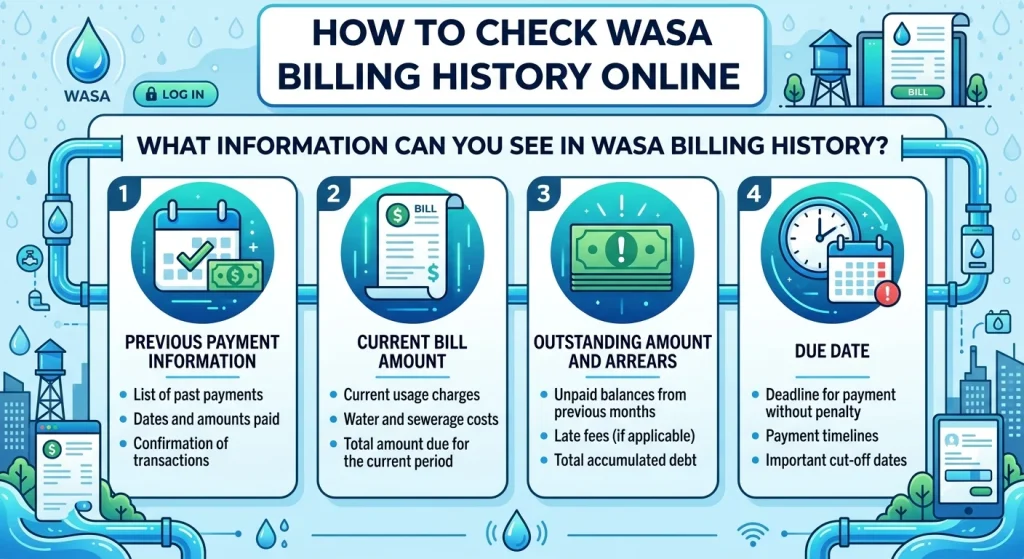
What Information Can You See in WASA Billing History?
A useful billing record should help you understand both your present bill and earlier payments.
The official WASA Faisalabad online consumer bill provides a good example of the type of information that may appear. Its web bill can show recent paid periods as payment history. It also separates billing details such as water bill, sewerage bill, current amount, arrears, service charges, surcharge and payable amount.
This makes the online bill useful for more than simply checking how much you have to pay.
Previous Payment Information
Previous payment information can help confirm whether WASA recorded an earlier payment.
For example, if you paid last month but the current bill still shows an unexpected outstanding amount, you can compare your receipt with the payment history available on the bill.
If there is a difference, keep your payment proof and contact the relevant WASA billing office.
Current Bill Amount
The current amount normally relates to charges added for the latest billing period.
Do not confuse the current amount with the final payable amount. Your total bill may also contain arrears, service charges, late payment charges or other applicable amounts.
Outstanding Amount and Arrears
Arrears are unpaid charges brought forward from an earlier billing period.
If your WASA bill amount check shows arrears even though you believe all earlier bills were paid, check your payment history and receipts before making a complaint.
A payment may sometimes need verification if the billing record does not match your proof of payment.
Due Date
The WASA bill due date tells you when payment should be made.
It is useful to check the due date whenever you perform a WASA bill inquiry because the payable amount can change after the due date.
The official Faisalabad consumer bill, for example, separately displays the amount payable within the due date and the amount payable after the due date when a surcharge applies.
How to Check Whether an Old WASA Bill Was Paid
If your online consumer bill contains payment history, look for the billing month you want to verify.
Then compare it with your bank receipt, mobile wallet record, payment application history, ATM receipt or other proof of payment.
If the billing period appears as paid, it indicates that the payment has been recorded in the history displayed by that system.
If you paid the bill but cannot find the payment in the available history, do not immediately pay the same amount again without checking.
First confirm your transaction status through the payment service you used. Then contact your local WASA office if the payment still appears to be missing.
Keep your transaction ID and receipt because they can help when requesting WASA bill verification.
How to Check WASA Bill Online
If you only need the latest WASA water bill online check, the process is usually easier than searching for older records.
Visit the official WASA website for your city and open its bill service.
WASA Lahore’s official website currently provides a Duplicate Bill option and states that consumers who misplace a bill or do not receive it in time can retrieve it online.
Other WASA offices may offer similar tools through their own websites.
Once your consumer bill opens, check the name, connection information, billing period, amount, due date and any previous balance.
This is also a simple way to perform WASA bill verification before making a payment.
WASA Duplicate Bill Online
A duplicate bill is a new copy of your consumer bill. It can be useful if the original printed bill is lost, damaged or never delivered.
A duplicate bill normally contains the same important billing information you need for payment, including the billing account, due date, charges and payable amount.
Official WASA websites in Lahore and Faisalabad provide online duplicate bill services.
A duplicate bill is not automatically the same thing as a complete WASA billing history. It mainly gives you access to the bill currently available through the billing system, although that bill may also display recent payment information.
How to Download WASA Bill PDF
Some people search for WASA bill download PDF because they want to keep a digital copy.
After opening your bill, check whether the website provides a download or print option.
If there is no direct PDF button, most modern browsers allow you to open the print menu and choose an option such as Save as PDF. This creates a personal PDF copy of the page that you can store on your phone or computer.
Before saving it, check that the account details, billing period, due date and payable amount are visible.
How to Print WASA Bill Online
A printed duplicate bill can be useful when you want a paper record or need the bill for another purpose.
Open the WASA consumer bill and use the print option available on the billing page or in your browser.
The official Faisalabad web bill currently includes a print option for its duplicate consumer copy.
Check the print preview before printing. Make sure the account number, bill amount, due date and billing period are not cut off.
Difference Between Current Bill and Billing History
These two terms are related but they are not the same.
A current bill tells you what is being charged for the latest billing period.
Billing history provides information connected with earlier bills or payments.
For example, your current bill may show Rs. X as the present charge and another amount as arrears. Payment history can help you understand whether earlier billing periods were recorded as paid.
This is why learning how to check WASA billing history can be helpful when you find an unexpected previous balance on your new bill.
What If Full WASA Bill History Is Not Available Online?
This is an important point.
Not every WASA online billing system provides a full month-by-month archive for consumers. A portal may show only the current duplicate bill and a few recent payment periods.
If the month you need is not visible, contact the WASA office for your city.
Ask whether they can provide an account statement, payment record, billing record or verification of a specific billing period.
Take your account information and any available payment receipts with you if an office visit is required.
Do not claim an old bill was paid only from memory. A transaction receipt, bank record or payment confirmation gives you much stronger proof.
What to Do If Your WASA Billing History Looks Wrong
Billing mistakes or payment record issues should be checked carefully.
Start by comparing the current WASA consumer bill with your previous bill and payment receipt.
Check whether the account number is the same on both documents.
Next, look at the current amount and arrears separately. An outstanding amount may come from a previous billing period rather than the latest water charges.
If you have proof that the amount was already paid, contact the relevant WASA office or complaint service and provide the payment details.
WASA Lahore advises consumers to keep water and sewer bills up to date and provides complaint and contact services through its official website. It also warns consumers not to give bill payments directly to unauthorized people claiming to represent WASA.
For WASA Faisalabad, the official website currently lists complaint channels including its complaint service, website form and helpline.
Why You Should Check Your WASA Billing History
Checking your billing information from time to time can prevent small issues from becoming bigger problems.
It helps you notice unexpected arrears, confirm previous payments, compare monthly water charges and keep a record of your household expenses.
Billing history can also be useful when moving into a rented property or buying a property.
WASA Lahore specifically advises people buying a property to make sure there are no outstanding water utility bills or arrears against it. It gives similar advice for rented properties.
This makes bill verification important not only for regular monthly payments but also when ownership or tenancy changes.
Understanding Water and Sewerage Charges
A WASA water bill may contain more than one type of charge.
Water charges relate to the water service provided to the connection.
Sewerage charges relate to sewerage services.
Depending on the local billing rules, other charges may also appear.
The Faisalabad online billing format, for example, can separately show water charges, sewerage charges, arrears, service charges, surcharge and the total amount payable.
Always read each part of the bill before assuming that the total amount represents only your monthly water usage.
Can WASA Billing History Help Track Water Costs?
Yes.
Even a simple record of your monthly bills can help you understand how your water costs change over time.
Save your WASA bill each month and record the amount in a notebook, spreadsheet or phone note.
After several months, you can compare the amounts.
A sudden increase does not always mean that more water was used. It may also involve arrears, changes in applicable charges, a surcharge or another billing adjustment.
Check the full billing information before deciding what caused the increase.
Is WASA Bill Online Free?
Official online bill checking services generally allow consumers to view their billing information without buying a copy of the bill.
For example, WASA Faisalabad provides a public duplicate bill lookup on its official website using the WASA account number.
However, normal internet, printing, banking or payment service costs may still apply depending on how you access, print or pay the bill.
You should not need to pay an unknown third-party website simply to find basic WASA billing information that is available through an official service.
How to Keep Your Own WASA Bill History
Because a full online archive may not always be available, keeping your own copies is a simple and useful habit.
Save one digital copy of each monthly WASA bill and one payment receipt.
Name the files by month and year, such as WASA Bill January 2026 and WASA Payment January 2026.
This creates your own billing history even if the online portal later shows only recent information.
Your saved records can also help with billing disputes, property records, expense tracking and payment verification.
Common Problems When Checking WASA Bill Online
Sometimes the WASA bill online check may not work on the first attempt.
An incorrect account number is one common reason. Check every digit against your printed bill.
The billing website may also be temporarily unavailable or slow.
Another problem is using a billing portal for the wrong city. WASA services are handled by different agencies, so use the official website connected with your local water connection.
You may also find that the online system shows your current bill but not the old billing month you need. In that case, contact your WASA office instead of relying on unofficial websites.
WASA Bill Payment and Payment History
Checking a bill and paying a bill are two different steps.
First verify your consumer information, billing period, payable amount and due date.
Then use a payment method supported for your local WASA bill.
After payment, keep the transaction receipt or digital confirmation.
Do not depend only on a screenshot of the bill. A payment receipt is more useful when you need to prove that money was actually paid.
WASA Lahore also warns consumers that its staff are not authorized to receive cash payments personally on behalf of consumers. Payments should be made through authorized methods.
FAQs
Open the official WASA billing website for your city, enter the account or consumer information requested and view the bill. If the system provides payment history, previous billing periods or recent paid months may appear there.
It depends on your local WASA billing system. Some systems show recent payment history but a complete archive of every previous bill may not be available online
Yes, if your local WASA billing portal uses a consumer number. Other portals may call it an account number. Use the number requested on the official website.
You can use a reference number only when your local WASA portal specifically requests it. Some WASA systems use an account number instead.
Open your online consumer bill and check the current charges, arrears, service charges, surcharge if applicable and total payable amount.