How to Avoid Mistakes When Paying Bills Online: A Complete Safety Guide
Paying bills online has made daily life much easier. People can now pay electricity bills, water bills, internet bills and other utility bills without standing in long lines or visiting payment offices. With just a few clicks, a payment can be completed from a mobile phone or computer.
However, online payments also require attention. A small mistake, such as entering the wrong billing account number, using an unsafe website or forgetting to save a payment receipt, can create unnecessary problems. These issues may lead to failed transactions, duplicate payments, late payment fees or even financial scams.
Learning how to avoid mistakes when paying bills online helps users protect their money, keep payment records safe and complete transactions without stress. Whether you are using a bank app, a payment gateway or an official bill payment portal, following simple safety steps can make your online payment experience secure and smooth.
This guide explains the most common online bill payment mistakes, safe payment practices and simple steps to protect your personal and financial information.
Why Online Bill Payment Mistakes Happen
Online bill payments are usually quick but mistakes can happen because users are often in a hurry or do not check important details before clicking the payment button.
Some common reasons behind payment mistakes include:
- Entering an incorrect billing account number
- Paying through an unofficial or fake website
- Ignoring payment confirmation messages
- Using weak passwords or unsafe internet connections
- Making payments without checking the bill amount
- Paying the same bill more than once
- Not saving payment proof after completing a transaction
Most online payment problems are avoidable. Taking an extra minute to review details before payment can prevent bigger issues later.
Common Mistakes During Bill Payment and How to Avoid Them
Understanding common mistakes during bill payment is the first step toward safer transactions. Below are some frequent problems users face and simple solutions.
Common Mistake | Why It Happens | How to Avoid It |
Entering the wrong account number | Users type information quickly without checking | Always perform a billing account number check before payment |
Using a fake payment website | Scammers create websites that look real | Use only the official bill payment portal |
Not saving payment proof | Users close the page after payment | Save the payment receipt and transaction details |
Paying twice accidentally | Users retry when payment is delayed | Check transaction status before making another payment |
Ignoring security warnings | Users do not check website safety | Use secure online payment methods and trusted platforms |
Verify Bill Details Before Paying Online
One of the most important online bill payment safety tips is to carefully check your bill information before completing any transaction.
Before paying, always verify:
- Your name on the bill
- Billing account number
- Current bill amount
- Payment due date
- Previous payment records
- Service provider information
For example, when paying a water bill through a WASA online bill pay system, users should confirm that the consumer number and billing details match their account. Entering an incorrect number may send money to the wrong account or create delays in updating payment records.
A simple habit of checking details before payment can help you avoid many common problems.
Use Only the Official Bill Payment Portal
One of the biggest risks in online bill payment is using fake websites. Cybercriminals often create websites that look similar to official payment pages to steal customer information.
Always use the official bill payment portal provided by your utility company or government service provider.
Before entering payment details, check:
- Website address is correct
- Website uses HTTPS security
- Company information is available
- Payment options are clearly listed
- Contact information is genuine
Avoid clicking random payment links received through emails, messages or social media. Instead, open your browser and manually visit the official website.
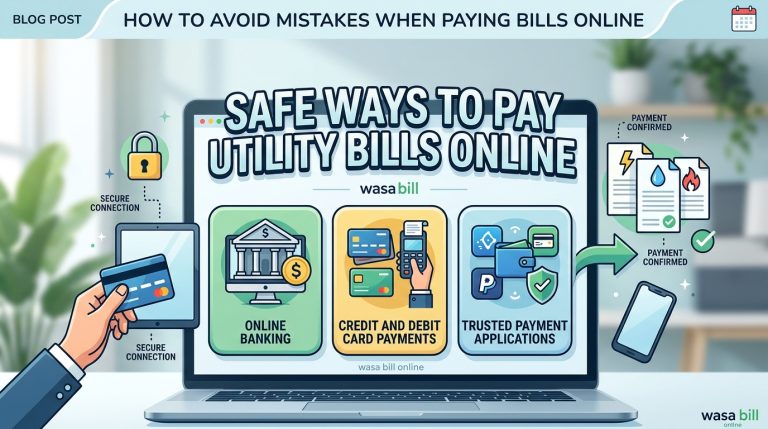
Safe Ways to Pay Utility Bills Online
Using secure payment methods reduces the chances of fraud and payment problems. Today, many trusted options are available for paying utility bills online.
Some safe payment methods include:
Online Banking
Online banking allows customers to pay bills directly through their bank accounts. It provides transaction records and security features such as login protection and payment notifications.
Always use your bank’s official mobile app or website instead of entering banking details on unknown platforms.
Credit and Debit Card Payments
Cards are commonly used for online payments, but users should follow proper credit card payment security practices.
Important safety steps include:
- Never share your card PIN or OTP
- Use cards only on trusted websites
- Enable transaction alerts
- Check bank statements regularly
- Avoid saving card details on unknown websites
Trusted Payment Applications
Many utility providers work with trusted payment services that allow customers to complete transactions easily. Before using any app, confirm that it is officially connected with your service provider.
Protect Your Information During Online Bill Payments
Online transaction security depends on how carefully users handle personal information.
Never share:
- Bank account passwords
- Card PIN numbers
- One-time passwords
- Security codes
- Login details
Legitimate bill payment companies and banks will never ask for your password or OTP through phone calls, emails or messages.
If someone requests this information while offering help with your bill payment, it may be a sign of a scam.
How to Avoid Phishing Scams During Online Bill Pay
Phishing scams online bill pay problems are increasing because scammers use fake messages and websites to trick users.
A phishing message may:
- Claim your bill is overdue
- Threaten service disconnection
- Offer fake discounts
- Ask you to update payment information
- Send a suspicious payment link
To avoid these scams:
- Do not open unknown payment links.
- Check the sender before responding.
- Visit the official website directly.
- Confirm messages with the service provider if unsure.
- Report suspicious activity.
Following these steps can help you stay protected from online bill scams.
What to Do When an Online Transaction Fails
Sometimes an online banking transaction failed message appears after payment. This can happen because of internet problems, bank server issues, payment gateway problems or system errors.
When a payment fails:
- Do not immediately pay again.
- Check your bank account balance.
- Review your transaction history.
- Check whether the bill payment status has updated.
- Contact your bank or service provider if needed.
Many users make the mistake of trying again immediately, which can result in a duplicate payment.
How to Prevent Duplicate Bill Payments
A duplicate payment happens when the same bill is paid more than once. This usually occurs when a payment page freezes or users do not receive instant confirmation.
To prevent duplicate payments:
- Wait for payment confirmation
- Check your transaction status first
- Keep the transaction reference number
- Avoid clicking the payment button multiple times
If you are charged twice, contact your bank or service provider. In many cases, the extra amount can be returned through the duplicate bill payment refund process.
How to Check Online Bill Payment Status
After completing a payment, users should confirm that the transaction was successful.
You can check payment status by:
- Logging into the official payment portal
- Checking your bank transaction history
- Using the payment reference number
- Reviewing SMS or email confirmation
Keeping a record of your payment helps solve problems quickly if there is a delay in updating your account.
Save Your Bill Payment Receipt Online
A payment receipt is important proof that you completed a transaction.
After paying any bill, save:
- Electricity bill payment receipt
- Payment confirmation message
- Transaction reference number
- Date and amount paid
You can store receipts by:
- Downloading PDF copies
- Saving email confirmations
- Keeping digital folders
- Taking screenshots when necessary
Knowing how to save bill payment receipts online makes it easier to handle disputes, refunds or account verification issues.
FAQs
How can I avoid mistakes when paying bills online?
You can avoid online bill payment mistakes by checking your billing account number, confirming the bill amount, verifying the payment due date, using trusted payment methods and saving your payment confirmation after every transaction.
What should I do if my online bill payment fails?
If your online bill payment fails, do not make another payment immediately. First, check your bank account, transaction history, and payment status. If money was deducted but the bill is not updated, contact your bank or service provider with your transaction reference number.
What should I do if I am charged twice for the same bill?
If you are charged twice for the same bill, contact your bank or utility provider and provide your payment receipts and transaction details. Many providers offer a duplicate bill payment refund after verification.
Is online bill payment safe with a credit card?
Yes, online bill payment can be safe with a credit card when you use trusted websites and follow credit card payment security practices. Enable transaction alerts, avoid public Wi-Fi and never share your card PIN or OTP.
How can I make online bill payments more secure?
You can make online bill payments more secure by using strong passwords, enabling two-factor authentication, avoiding public Wi-Fi, updating your devices, checking payment details and using secure online payment methods.
How can I make online bill payments more secure?
You can make online bill payments more secure by using strong passwords, enabling two-factor authentication, avoiding public Wi-Fi, updating your devices, checking payment details and using secure online payment methods.