WASA New Connection Application Process: Complete Guide to Apply for a New Water Connection
Getting a new water connection is an important step when you move into a new home, build a new property or need a separate water supply. WASA provides water supply and sanitation services to customers and the new connection process helps residents get access to regular water services.
The WASA New Connection Application Process usually includes submitting an application, providing required documents, paying applicable charges, property verification and installation of the connection. Understanding each step makes the process easier and helps avoid unnecessary delays.
This guide explains everything about applying for a new WASA connection, required documents, charges, verification steps and what you need to know after receiving your connection.
What Is a WASA New Connection?
A WASA new connection is a request made by a property owner or customer to receive a fresh water supply connection from the Water and Sanitation Agency. The connection allows the customer to receive a regular water supply and a monthly WASA water bill based on usage and applicable water charges.
A new connection is generally required for:
- Newly constructed houses
- Newly purchased properties
- Commercial buildings
- Properties without an existing water connection
- Separate water supply requirements
After approval, WASA provides a customer record that includes important details such as the WASA consumer number and WASA account number. These details are later used for WASA bill inquiry, WASA bill payment and checking monthly billing information.
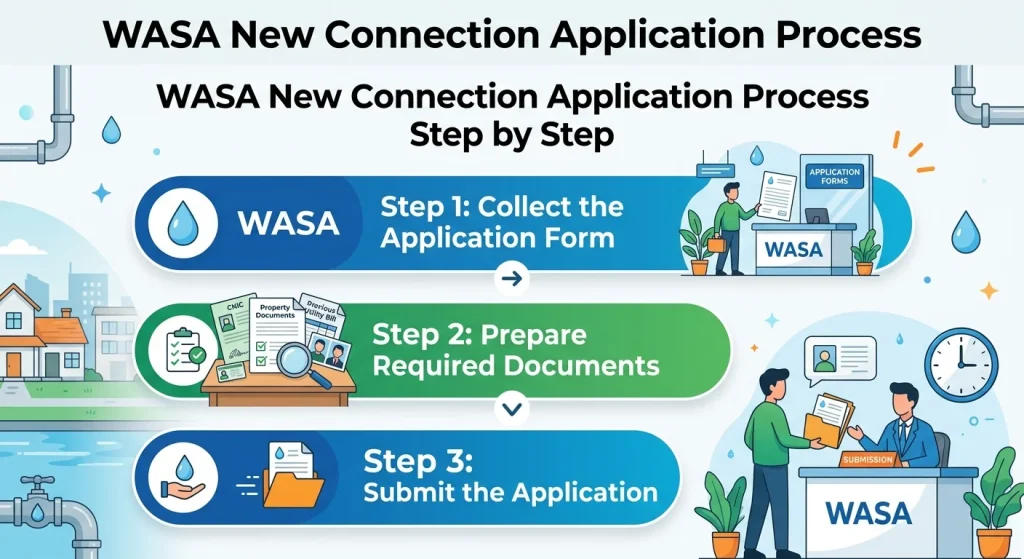
WASA New Connection Application Process Step by Step
The process of getting a new WASA water connection involves several stages. Each stage ensures that the connection is provided to the correct property and customer.
Step 1: Collect the Application Form
The first step is to get the WASA new connection application form. Customers can usually obtain the form from the nearest WASA office or through the official service channels available in their area.
The application form requires basic information such as:
- Applicant name
- Property address
- Contact information
- Property ownership details
- Type of connection required
Providing correct information helps WASA process the request smoothly.
Step 2: Prepare Required Documents
Before submitting the application, customers need to prepare the required documents. These documents help verify the applicant and property details.
Commonly required documents may include:
Document | Purpose |
Applicant identification | Confirms customer identity |
Property ownership proof | Verifies legal ownership |
Property address details | Confirms connection location |
Building documents | Provides property information |
Previous records (if applicable) | Helps check existing services |
Requirements can vary depending on the WASA region and type of property. Customers should confirm the exact document list from their local WASA office.
Step 3: Submit the Application
After completing the form and attaching documents, submit the application to the relevant WASA office.
During submission, WASA staff review the application details and create a request record. Customers may receive an application reference number, which can help with future WASA connection status inquiries.
Keeping a copy of submitted documents and application details is useful for tracking progress.
Property Verification for WASA Connection
After receiving the application, WASA may conduct a property inspection or verification process.
During verification, officials check:
- Property location
- Availability of water supply lines
- Technical requirements
- Connection feasibility
- Required installation work
This step helps WASA determine whether the property can receive a new water connection and what work may be needed.
WASA New Connection Charges and Fees
The cost of a new connection depends on different factors, including location, connection type, pipe requirements and applicable WASA charges.
Possible charges may include:
- Application processing charges
- Connection installation charges
- Meter charges
- Service charges
- Other applicable fees
The exact amount can change according to WASA policies and local requirements. Customers should confirm the latest charges from their nearest WASA office before making payment.
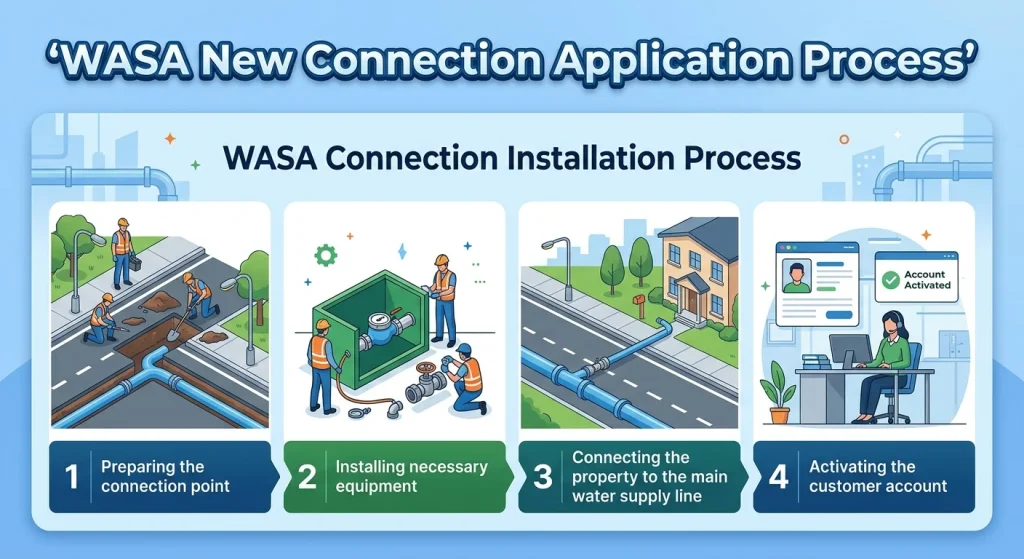
WASA Connection Installation Process
Once the application is approved and required payments are completed, WASA schedules the connection installation.
The installation process may include:
- Preparing the connection point
- Installing necessary equipment
- Connecting the property to the main water supply line
- Activating the customer account
After successful installation, the customer becomes part of the WASA billing system and starts receiving monthly water and sanitation bills.
Documents and Information Needed After Getting a WASA Connection
After receiving your connection, it is important to save your WASA customer information. These details help you manage your account easily.
Important information includes:
Information | Use |
WASA consumer number | Used for checking bills and payments |
WASA account number | Helps identify your customer account |
Reference number | Useful for application tracking |
Connection details | Required for customer support |
These details allow customers to:
- Check WASA bill online
- View WASA bill details
- Download WASA duplicate bill
- Print WASA bill
- Verify payment status
How to Check WASA Bill After Getting a New Connection
After your new connection becomes active, you can check your monthly bill using available WASA online services.
A customer may need:
- WASA consumer number
- WASA account number
- Reference number
Online bill checking helps customers view:
- Current WASA bill amount
- WASA bill due date
- Previous bill history
- Payment status
- Water charges information
Many customers prefer checking their WASA online bill because it saves time and avoids visiting offices for simple billing questions.
WASA Online Payment After New Connection
Once you receive your first bill, you can use available payment methods to pay your WASA charges.
Online payment options help customers:
- Pay WASA bill from home
- Check payment confirmation
- Avoid late payments
- Maintain payment history
The WASA online payment system is designed to make bill management easier for customers who prefer digital services.
Difference Between WASA Consumer Number and Account Number
Many customers confuse their WASA consumer number and account number. Both are important but they serve different purposes.
Term | Meaning |
WASA consumer number | A unique number connected with your water service |
WASA account number | A billing identification number for your account |
These numbers are required when using services like WASA bill online check, duplicate bill requests and customer support.
Common Reasons for WASA New Connection Delays
Sometimes a new connection application may take longer because of incomplete information or technical issues.
Common reasons include:
- Missing documents
- Incorrect property information
- Pending verification
- Required infrastructure work
- Unpaid charges
Submitting complete information and checking application progress regularly can help reduce delays.
How to Contact WASA Customer Service
If customers face problems related to a new connection, billing or water supply, they can contact WASA customer service.
WASA customer care can help with:
- New connection questions
- WASA bill complaints
- Billing information
- Payment issues
- Connection status
Customers can also visit their nearest WASA office for detailed assistance.
FAQs
You can apply by completing the WASA new connection application form, attaching required documents and submitting it to the relevant WASA office.
Documents usually include identification, property ownership proof, address details and other required papers depending on your location and connection type.
You can check your WASA bill using your WASA consumer number or account number through available online billing services.
Yes, customers can request or download a duplicate WASA bill using their account details through available WASA online services.
Customers can use available WASA online payment methods to pay their monthly water bill and verify payment status.