WASA Bill Online vs Paper Bill: What's the Difference?
If you receive a WASA water and sewerage bill, you may wonder whether an online bill is the same as the paper bill delivered to your home.
In most cases, the answer is simple: the online bill and paper bill contain the same important billing information but they are received and used in different ways.
A paper bill comes as a printed document. An online bill can be viewed through a digital billing system using information such as your account number, consumer number, registration number or another number used by your local WASA office.
Online access can be useful when your paper bill is late, lost, damaged or simply not available. Some WASA offices also provide facilities to view, download and print a duplicate consumer bill online. For example, the Punjab Information Technology Board says its WASA Online Duplicate Billing System was created so consumers could get duplicate bills without visiting a WASA zonal office. PITB
This guide explains the difference between a WASA bill online and a paper bill, what information you can find on each, how online checking works and when a duplicate bill may be useful.
WASA Bill Online vs Paper Bill
Feature | WASA Online Bill | Paper Bill |
Format | Digital | Printed |
Where you receive it | Online billing portal | Physical delivery |
Can you check the amount? | Yes, where online service is available | Yes |
Can you see the due date? | Usually shown on the bill | Shown on the printed bill |
Can you download it? | Available on some WASA portals | Not applicable |
Can you print it? | Yes, after downloading or opening it | Already printed |
Useful if the original bill is lost | Yes | No, you need another copy |
Need an internet connection | Yes | No |
Can be used for bill checking | Yes | Yes |
Can show billing information | Yes | Yes |
The exact online service and required number can vary by city. For example, official WASA portals in Multan and Gujranwala provide online duplicate bill services, while the Punjab WASA website provides access to bill information and payment status. WASA Multan+2
What Is a WASA Paper Bill?
A WASA paper bill is the printed bill issued for a water and sewerage connection.
It normally contains important information about your account and the amount you need to pay. Depending on the local WASA system, the bill may show details such as:
- Consumer or account information
- Customer name and address
- Account or registration number
- Meter information, where applicable
- Bill period
- Issue date
- Due date
- Current charges
- Previous balance or arrears
- Water supply charges
- Sewerage charges
- Other applicable service charges
- Total payable amount
- Payment history or billing status
The exact design is not the same for every city.
For example, a publicly available WASA bill document from Hyderabad shows information including the issue date, due date, billing month, current charges, arrears, payment history and payable amount. This shows why consumers should read the actual bill issued by their local authority rather than assume every WASA bill uses exactly the same format. Sindh Police
What Is a WASA Online Bill?
A WASA online bill is a digital version of your billing information that you can access through an online billing system.
Instead of waiting for a paper copy, you can enter the number requested by your local WASA portal and view the available bill details.
Some official WASA systems call this a duplicate bill or duplicate consumer bill. That does not necessarily mean the amount is different from the original paper bill. It generally means you are getting another copy of the bill for viewing, downloading or printing.
The Punjab Information Technology Board states that its Online Duplicate Billing System allows WASA consumers to download a duplicate bill by using an assigned account number. It also explains that WASA zonal offices upload billing information to the system. PITB
Is the Online Bill the Same as the Paper Bill?
For normal bill checking, the online and paper versions are intended to provide the billing information you need.
The important details are usually related to the same consumer account and billing period.
However, the way you receive the information is different.
A paper bill is physically delivered. An online bill is retrieved through a digital system.
If you notice a difference between the amount on your paper bill and the amount shown online, do not assume that one is automatically correct. Check the bill period, due date, account number, previous balance, payment status and any recent payment. If the difference remains, contact the relevant WASA office.
This is especially important when a payment was made recently and the online billing system has not yet reflected it.
Why Do People Check Their WASA Bill Online?
There are several simple reasons.
A paper bill can be misplaced. It can also arrive late or become damaged. An online bill can give you another way to access the billing information.
The Punjab Information Technology Board says the online duplicate billing system was introduced to reduce the need for consumers to visit WASA zonal offices just to obtain duplicate bills. PITB
Online checking can also help when you want to confirm your current bill amount or due date before making a payment.
For example, if you are away from home and do not have your paper bill with you, an available WASA online service may allow you to retrieve the bill using your account or registration details.
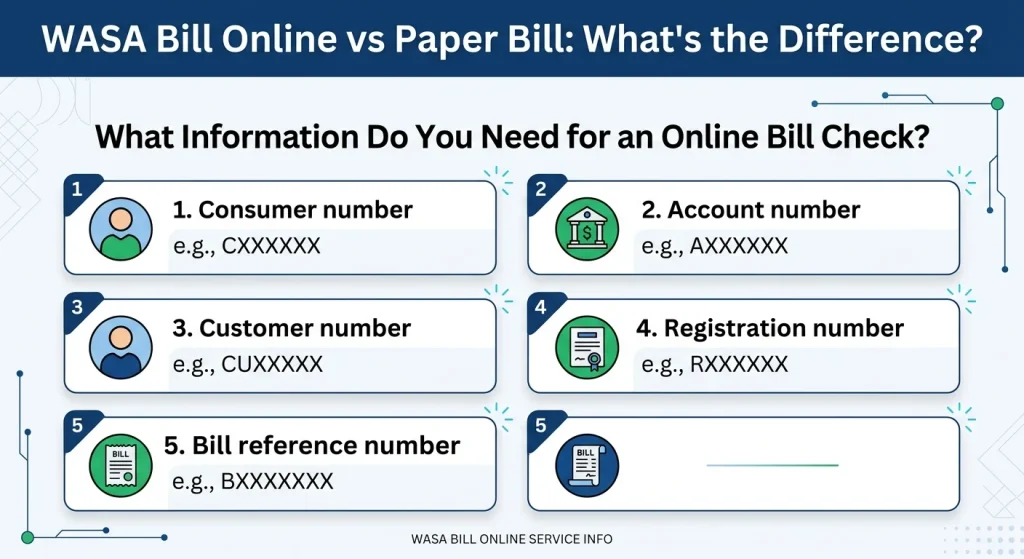
What Information Do You Need for an Online Bill Check?
You normally need an identifier connected to your water account.
This may be called:
- Consumer number
- Account number
- Customer number
- Registration number
- Bill reference number
The name is not always the same in every WASA system.
For example, the official WASA Gujranwala online bill page asks users to search with either a registration number or account number. The official WASA Multan duplicate bill page asks users to enter an account number.
This is why it is better to look at your previous bill before starting a WASA bill check online.
What Can You See on a WASA Online Bill?
The information depends on the billing system used by your local authority.
Common information may include your current bill, bill period, due date, payable amount, previous balance and payment-related details.
You may also see information connected with water supply and sewerage services.
Some bills can include:
Current bill: Charges for the present billing period.
Previous bill: Information from an earlier billing period.
Outstanding amount: Money that remains unpaid from previous or current charges.
Payable amount: The amount that needs to be paid according to the bill.
Due date: The last stated date for payment without applicable late charges.
Bill period: The period covered by the bill.
Meter number: The identification number of the meter, where metered service is used.
Water supply charges: Charges related to water service.
Sewerage charges: Charges related to sewerage services.
The exact names and fields can vary between WASA offices.
WASA Duplicate Bill vs Original Paper Bill
A duplicate WASA bill is useful when you do not have the original paper copy.
Suppose your paper bill was lost before you paid it. If your city’s WASA office provides an online duplicate bill service, you may be able to retrieve another copy using your account information.
The duplicate copy can then be saved or printed.
This is one of the main reasons online billing is useful.
The official Punjab Information Technology Board says its WASA Online Duplicate Billing System allows consumers to download a duplicate bill when required. PITB
Is a Duplicate WASA Bill Different From the Original?
A duplicate copy is not normally intended to create a new bill.
It is another copy of the billing information connected with your account.
Still, always check the billing period and amount before making a payment. If you have already paid the bill, check the payment status so that you do not accidentally pay the same amount twice.
WASA Bill Download and Print
If your local WASA portal provides a download option, you can save the bill on your phone or computer.
You may then use the saved copy for your records.
Some portals also provide a print option.
For example, WASA Multan describes its online service as a way to generate and print a duplicate consumer bill. WASA Gujranwala also lists duplicate bill printing and downloading among its online services. WASA Multan+1
This can be helpful if you need a physical copy for payment or personal records.
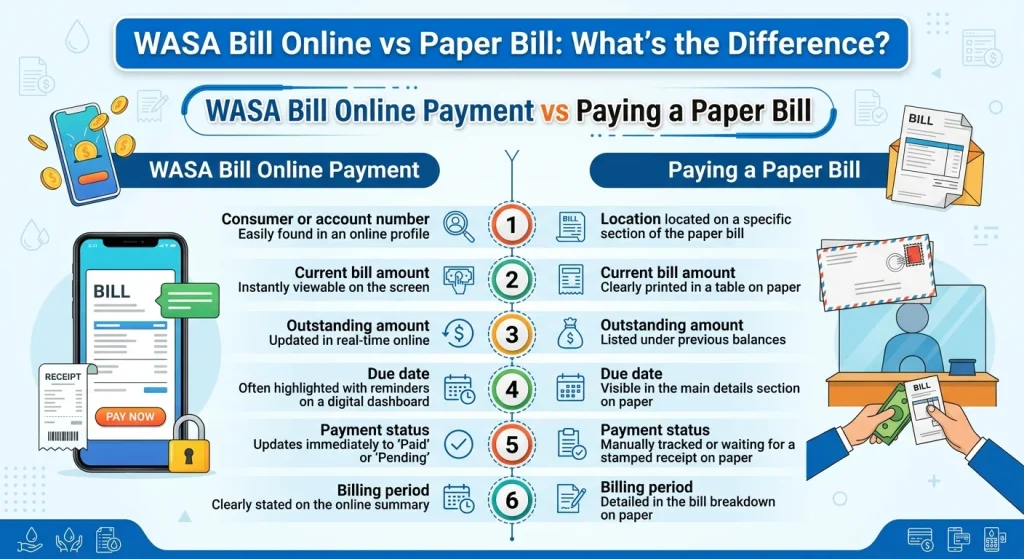
WASA Bill Online Payment vs Paying a Paper Bill
Checking a bill online and paying a bill online are two different things.
An online bill check lets you see billing information.
An online payment service lets you pay the amount through an available payment channel.
Whether online payment is available and which banks or payment services can be used, depends on the relevant WASA authority and its payment arrangements.
Punjab WASA currently lists bill information and payment status among its online service functions. Punjab WASA
Before paying, carefully check:
- Consumer or account number
- Current bill amount
- Outstanding amount
- Due date
- Payment status
- Billing period
After payment, keep your transaction receipt or confirmation.
Which Is Better: Online Bill or Paper Bill?
There is no single answer for every consumer.
The two formats serve different needs.
A paper bill is useful if you prefer a physical record and do not want to use an internet connection to view your bill.
An online bill is useful when you want quick access to billing information or need a duplicate copy after losing the paper bill.
For many consumers, the most useful approach is to keep the paper bill when it arrives and use online checking as a backup.
That way, you have both options available.
Online Bill vs Paper Bill: Main Differences
The biggest difference is not usually the billing information itself. The main difference is how you access it.
With a paper bill, the information comes to you in printed form.
With an online bill, you retrieve the information digitally.
An online system can also make it easier to:
- Check a current bill
- Check the due date
- Check the outstanding amount
- View available billing information
- Get a duplicate bill
- Download a bill
- Print a bill
- Check payment information where supported
The exact features depend on your local WASA system.
What If Your Paper WASA Bill Has Not Arrived?
You do not necessarily need to wait for the paper copy before checking your bill.
First, check whether your local WASA authority offers an online bill service.
If it does, use the account or registration information requested by that system.
If you can see the bill online, check the amount and due date.
If the online bill is also unavailable, contact the relevant WASA office for help.
Do not use an unrelated website that asks for sensitive information simply because your paper bill has not arrived.
What If the Online Bill Shows the Wrong Amount?
First, check that you entered the correct account or consumer information.
Then check the billing period.
After that, compare the current bill with your previous bill and any payment receipt you have.
A difference may happen because:
- A payment was made recently
- An older amount is still outstanding
- A new billing period has started
- A late payment charge has been added
- The online system has not yet updated
- There is an account or billing issue
If the information still looks incorrect, contact your local WASA office and provide your account details and payment proof if needed.
How to Check Your WASA Bill Status
A bill status tells you useful information about the current state of your account or payment.
Depending on the system, you may be able to see whether an amount is current, outstanding or paid.
Punjab WASA states that its online services include checking water bill and payment status. Punjab WASA
However, not every WASA office uses the same online system.
Always use the service connected with the authority that manages your water and sewerage connection.
Can You Check Previous WASA Bills Online?
This depends on the online billing system.
Some systems may provide current bill information or duplicate bills, while others may provide additional billing history.
Do not assume that every WASA portal keeps the same amount of historical data.
If the portal provides bill history, you may be able to compare a previous bill with your current bill.
This can help you understand changes in the payable amount and identify an older outstanding balance.
Why Your WASA Bill Amount May Change
Your water and sewerage bill may not have the same amount every month.
The amount can change because of the applicable tariff, service charges, previous outstanding balance, late charges, meter-related information where applicable or other charges included by the authority.
WASA tariff structures can also differ by city and consumer category.
For example, an official WASA Faisalabad tariff document includes separate areas for water supply, sewerage and drainage, infrastructure costs and different types of connections. Wasafa Faisalabad
This is why comparing only the final amount is not always enough. Look at the individual charges and billing period as well.
Online Bill Checking Is Not the Same in Every Pakistani City
One important point is often missed when people search for “WASA bill online check Pakistan”.
There is not one identical WASA billing portal that works in exactly the same way for every city.
Different water and sanitation authorities may use different websites, account formats and online services.
For example:
- WASA Multan provides an online duplicate bill service. WASA Multan
- WASA Gujranwala provides online duplicate bill access using an account or registration number. Wasa Online Bill
- WASA Gujrat lists duplicate bill printing and downloading among its online services. WASA Gujrat
- Punjab WASA provides bill information and payment status services. Punjab WASA
So, when you want to check your WASA water bill online, first identify the authority serving your area.
WASA Bill Verification: What Should You Check?
Online bill verification does not mean simply looking at the final amount.
Before making a payment, compare the important details.
Check your:
Account information: Make sure the consumer or account number belongs to your connection.
Billing period: Confirm that the bill is for the expected month or period.
Current amount: Look at the charges for the current period.
Outstanding amount: Check whether an older amount is included.
Due date: Make sure you know the stated payment date.
Payment status: If you already paid, confirm whether the payment has been recorded.
Customer information: Check the name or address where those details are displayed.
If something does not match your records, contact the relevant authority before paying.
Common Mistakes When Checking a WASA Bill Online
Online bill checking is simple but small mistakes can cause problems.
Entering the Wrong Number
Do not mix your meter number with your account number unless the website specifically asks for the meter number.
Use the exact number requested by the portal.
Choosing the Wrong WASA Authority
A bill for one city may not be available through another city’s WASA portal.
Always select the correct authority.
Paying Without Checking the Account
Before confirming payment, compare the account information and payable amount.
Trusting an Unofficial Page Without Verification
An independent website can provide useful information but billing details should be checked against the relevant official authority whenever possible.
Final Thoughts
A WASA paper bill and a WASA online bill are mainly different in how you receive and access the information.
The paper bill gives you a physical copy. Online billing gives you digital access and where supported, can let you check the current bill, view the due date, download a duplicate copy, print the bill and check payment information.
Online billing can be especially useful when a paper bill is lost, damaged, delayed or not available.
Still, the online process is not identical across Pakistan. Different WASA authorities can use different account numbers, websites, and billing services. Official examples from Multan, Gujranwala, Gujrat and Punjab show that online duplicate billing and bill information services are available but their processes differ.
The safest habit is simple: keep your previous bill, note your account or consumer number, check the current bill and due date and use the official service for the WASA authority that serves your area.
FAQs
Is a WASA online bill the same as a paper bill?
The online and paper versions can provide the billing information for the same account and billing period. The main difference is the format. One is digital and the other is printed.
How can I check WASA bill online?
Open the online billing service for your local WASA authority and enter the account, consumer, registration or other number requested by that portal.
Can I get a WASA duplicate bill online?
Yes, some WASA authorities provide online duplicate bill services. The available method depends on your city and local billing system. Official WASA portals in Multan and Gujranwala provide duplicate bill services. WASA Multan+1
Can I download my WASA bill?
If your local online billing portal provides a download option, you can save a duplicate copy for your records
Can I check my current WASA bill online?
In areas with an active online billing service, you may be able to retrieve the current bill using the account information requested by the authority.